In October we wrote about Gemini 4 Argon, Google’s cheap and fast model. It scored well overall but failed badly on one project (overall score 26%). Gemini 4 Carbon is a newer model in the same Gemini 4 line, and we tested it on the same 119 drawing pages to see how it compares.
Carbon scored 83% overall and placed third in the November run of our benchmark. That run used version 6 and included 22 models, with GPT-6 Astra and Claude Fable 5.2 ahead of Carbon. Carbon found every floor plan in the test set and drew almost no wrong boxes on elevations. Those gains come with extra cost, and a page takes a median of 66.6 seconds, 7 to 8 times as long as Fable 5.2 or Argon.
Key takeaways
- Gemini 4 Carbon has an overall score of 83% and ranks 3rd of 22 models in CaseVBench v6.
- It found all 166 floor plans in the test set, while Argon missed 22 of them.
- Only 2 of its elevation boxes were wrong, but it missed 85 of the 300 elevations.
- It found 40 of the 90 countertops, fewer than half.
- A page costs $0.108 at the standard rate and takes a median of 66.6 seconds.
What is CaseVBench?
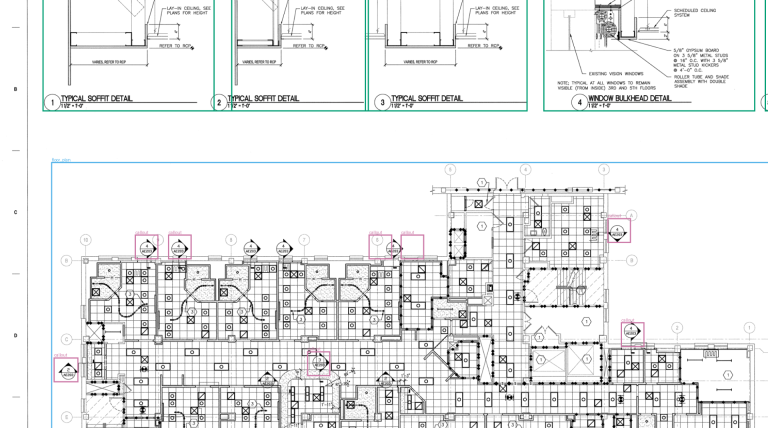
CaseVBench is our test of how well AI models find objects on architectural drawings. Each model gets a drawing page and must box every cabinet, countertop, floor plan, elevation and callout. We compare its boxes with those an expert drew on the same page.
A model’s box counts as a match when it overlaps the expert’s box by at least half. These matches give us three counts for each object type: objects found, objects missed, and extra boxes drawn on nothing. The score combines found objects, missed objects and extra boxes into one percentage.
The test set has 9 real projects and 119 pages, which every model sees under the same rules. Using the same pages and rules lets us compare the results side by side.
Where Gemini 4 Carbon lands among 22 models
Carbon is one of two new models in this run. Both reached the top three, and the table below shows how they compare with the leaders. It also includes Claude Fable 5.1, the version before Fable 5.2.
| Model | Rank of 22 | Overall score | Cost per page | Time per page |
|---|---|---|---|---|
| GPT-6 Astra | 1 | 92% | $0.186 | 28.2 s |
| Claude Fable 5.2 | 2 | 85% | $0.079 | 8.8 s |
| Gemini 4 Carbon | 3 | 83% | $0.108 | 66.6 s |
| Claude Opus 5.5 | 4 | 79% | $0.040 | 8.9 s |
| Gemini 4 Argon | 5 | 76% | $0.021 | 9.8 s |
| Claude Fable 5.1 | 7 | 70% | $0.148 | 22.3 s |
Cost and time are medians per page, meaning the middle values across the pages we tested. Google ran a 50% promotion on Carbon during our test, so we paid half the listed price. The table uses the standard rate because that is what a team would pay for real work.
Speed is the main difference here: Carbon is two points behind Fable 5.2 and costs about a third more per page. It also takes 66.6 seconds a page, 7 to 8 times as long as Fable 5.2 or Argon, which makes it the third-slowest model in the top 10.
Score by object type, with what Carbon found and missed
That overall score hides how differently Carbon handles each object, so we looked at the counts behind it. For each object type, the table shows how many objects Carbon found and missed compared with the expert’s boxes. It also shows how many boxes Carbon drew where there was nothing to find.
| Object | Score | Expert’s objects | Found | Missed | Extra boxes |
|---|---|---|---|---|---|
| Floor plans | 99% | 166 | 166 (100%) | 0 | 4 |
| Callouts | 89% | 557 | 513 (92%) | 44 | 81 |
| Elevations | 83% | 300 | 215 (72%) | 85 | 2 |
| Cabinets | 74% | 317 | 238 (75%) | 79 | 89 |
| Countertops | 49% | 90 | 40 (44%) | 50 | 33 |
These counts combine the results from all 9 projects, and they show each object type behaving differently.
Floor plans: every one found
Floor plans are the large, outlined drawings of a room or a level seen from above. Most strong models handle them well, but Argon returned no floor plans at all on one project. Carbon found all 166 floor plans across the 9 projects and drew only 4 extra boxes. Its floor plan score of 99% is the same as GPT-6 Astra’s.
Cabinets: the best score after Astra
A casework or millwork estimate starts with the cabinet count. Carbon scored 74% on cabinets, second only to GPT-6 Astra at 82%, and found 238 of the 317 cabinets.
Fable 5.2 found almost the same number (239), but it drew 115 extra boxes. Carbon drew 89 extra boxes, leaving an estimator fewer wrong boxes to delete before using the count.

Callouts: most of them, with some noise
Callouts are the small bubbles and tags that point to a detail or another sheet, and a busy page can hold dozens of them. Carbon found 513 of the 557 callouts and missed 44 in our test. It also drew 81 boxes on things that were not callouts, which still need to be removed.
Elevations: careful, but it misses some
Elevations are side views of a wall or a run of cabinets, and here Carbon behaves differently from the other models near the top of the benchmark. It drew 217 elevation boxes, and only 2 of those boxes were wrong. But it also skipped 85 of the 300 elevations that the expert marked.
In practice, you can believe Carbon when it marks an elevation, but you cannot assume it found them all. Its elevation score of 83% is below Claude Fable 5.1, which ranks four places lower overall.

Countertops: 40 of 90 found
Countertops are long, narrow shapes above the base cabinets. Most models in the benchmark struggle with them, and Carbon found 40 of the 90 countertops. That is fewer than half, and its score for this object type is 49%. Argon found 30, so Carbon improved, but its count still needs checking before you build a countertop quote.
A model that would rather miss than guess
The elevation result is easiest to see next to Fable 5.2, the model just above Carbon in the ranking. On elevations, Carbon draws far fewer wrong boxes, but it leaves more elevations out. On callouts the pattern reverses: Fable 5.2 drew 49 extra boxes to Carbon’s 81.
| Elevations | Gemini 4 Carbon | Claude Fable 5.2 |
|---|---|---|
| Missed | 85 | 55 |
| Extra boxes | 2 | 21 |
These two kinds of error create different work when you count objects for a takeoff. An extra box is visible, so someone can look at it and delete it. A missed object leaves no sign on the screen, so someone must search the sheets for it. Carbon’s careful approach makes review faster for the objects it found, but it does not help with those it skipped.
How tight Carbon’s boxes are
Even when Carbon finds an object, we still need to check how closely its box outlines it. To test that, we scored the top five models again with stricter rules for matching boxes. At 0.75, a box must overlap the expert’s box by three quarters; at 0.90, it must be almost exact.
| Model | Overlap 0.50 (standard) | 0.75 | 0.90 |
|---|---|---|---|
| GPT-6 Astra | 91.6% | 75.9% | 44.1% |
| Claude Fable 5.2 | 85.4% | 59.6% | 29.3% |
| Gemini 4 Carbon | 83.4% | 53.8% | 28.6% |
| Claude Opus 5.5 | 78.8% | 48.6% | 25.1% |
| Gemini 4 Argon | 75.7% | 46.8% | 25.6% |
Carbon’s score drops to 53.8% under the 0.75 rule, a steeper fall than Astra’s. So Carbon usually finds the right object, but its boxes fit less closely than Astra’s. That matters when you use the box to measure something, such as a countertop length. It matters much less when the box only tells an estimator where to look.
What changed from Argon
This brings us back to the question we started with. On the same pages, Carbon scores 7 points more than Argon overall, but it costs about 5 times as much per page and takes about 7 times as long.
What to expect if you upload your own drawing set to Gemini 4 Carbon
Say you run your next project through Carbon and open the results. In our test, each page went to the model on its own, with the same instructions every time, and that is the setup these numbers describe. Uploading a whole PDF into a chat window is a different setup, and the numbers don’t carry over to it. With that in mind, here is what you would find and how to check it.
The floor plans will all be there. Carbon didn’t miss one of the 166 in our set, so you can move past them quickly. The callouts look nearly as complete, with 44 of 557 missed. But Carbon also boxed 81 things that weren’t callouts, so start by clearing those out before anyone follows a callout to the wrong sheet.
Elevations need a different kind of check. Almost every elevation box Carbon draws is right: only 2 of 217 were wrong. That makes the page look trustworthy. The catch is what isn’t on the screen, because Carbon skipped 85 of the 300 elevations. You can spot a wrong box and delete it, but a missing one leaves no trace. So instead of checking the boxes Carbon drew, scan each sheet for the elevations it didn’t mark.
Cabinets go wrong in both directions at once. Carbon found 238 of 317 and drew 89 boxes on things that weren’t cabinets. Add those up and you get 327, close to the real 317. So a cabinet count can look right even when it’s made of misses and extras that cancel each other out. Countertops are the weakest object: Carbon found 40 of 90. Treat its countertop boxes as a starting point and check every elevation yourself.

Two more things to keep in mind. Your set may be easier or harder than average: across our 9 projects, Carbon scored as high as 97% and as low as 59%. The boxes also show where an object is, not how big it is, so don’t take lengths from them.
Before trying a whole set, take one sheet you’ve already counted by hand. Ask the model to mark every cabinet, then compare its marks with yours. Which did it miss, did it mark any twice, and does each box cover one cabinet or a whole run? That tells you what to check on the next sheet.
Where Gemini 4 Carbon fits in a takeoff workflow
Carbon’s slower pace can make sense when a missed object is expensive and time is not the limit. A floor plan silently dropped from a takeoff can cost more than a minute of processing. The same applies to a callout that nobody follows to its detail on another sheet. Carbon found every floor plan and 92% of callouts, and it drew almost no wrong elevation boxes.
That trade makes less sense when someone checks every page anyway. At 66.6 seconds a page, Carbon is 7 to 8 times slower than Fable 5.2 or Argon. If someone reviews every result, Argon’s 10-second, $0.021 pass or Fable 5.2’s 8.8-second pass may be the better trade.
For countertops and elevations, that review is needed before any Carbon output goes into a quote. Carbon misses more than half of the countertops and about a quarter of the elevations.
Carbon is the first Google model I would trust to find every floor plan. But at about a minute a page it is 7 to 8 times slower than Fable 5.2 or Argon. So we would use it where a miss costs more than the wait.
Volodymyr Hresko, co-founder of COXIT
Whichever model you pick, remember that our result is an average over 9 projects. Your drawings have their own layouts, symbols and quirks, and model updates arrive every few months. Before relying on any model, try the one-sheet test above on your own drawings. That is where our custom AI takeoff tool work starts.
Method and full results
All results come from CaseVBench v6, which we published on November 12, 2026. We tested 22 AI models on 119 architectural drawing pages under the same rules. Those pages cover 9 projects and contain the 5 object types used in this test.
The standard score uses an overlap of 0.50 between a model’s box and an expert’s box. We combine found, missed and extra-box counts across all 9 projects for the results. Cost and time are medians per page, with cost shown at the standard rate.