Gemini 4 Argon scored 76% on COXIT’s CaseVBench architectural drawing benchmark, placing third out of 20 AI models. Only GPT-6 Astra, at 92%, and Claude Opus 5.5, at 79%, scored higher.
What makes Argon interesting is its price. At $0.021 per page at the standard rate, it costs about half as much as Claude Opus 5.5 and roughly one ninth as much as GPT-6 Astra. It is also Google’s strongest model in our architectural drawing tests so far.
But the overall score does not tell the whole story.
Argon is the second best model at detecting cabinets. On the most cabinet-heavy project in our dataset, it outperformed every other model, including GPT-6 Astra. Yet on another project, it failed to detect an entire set of floor plans and missed almost all the elevations.
For construction estimating teams, that difference matters. Argon can deliver strong results at a low cost, particularly when counting cabinets and locating small drawing symbols. It can also make serious mistakes on individual projects, even when its overall benchmark score looks reassuring.
The key findings
- Gemini 4 Argon scored 76% overall and ranked third out of 20 models.
- At $0.021 per page, it offers a lower cost than Claude Opus 5.5 and GPT-6 Astra.
- Its strongest results were for cabinets, callouts and countertops, where it ranked second, third and fourth respectively.
- Its floor plan score was 91%, but a complete failure on one project pulled down its results.
- Its bounding boxes are often too loose for precise countertop measurement.
- Argon is promising for lower cost drawing analysis, but teams should check every new drawing set before relying on its totals.
What is CaseVBench?
CaseVBench is COXIT’s benchmark for scoring how well AI models identify objects in architectural drawings.
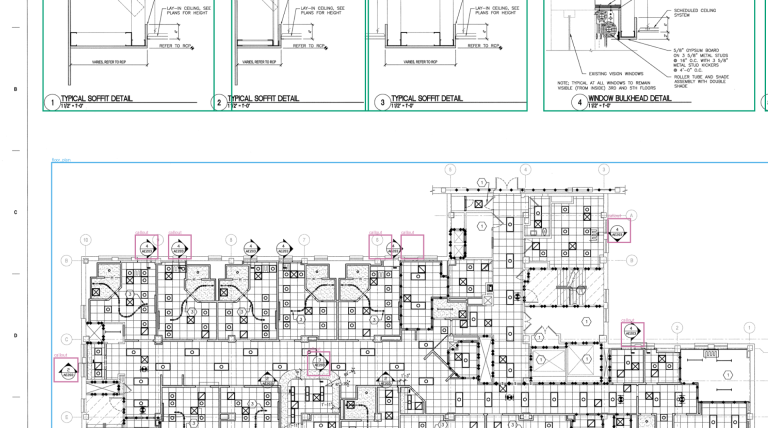
Each model receives a drawing page and must locate five types of objects. These are cabinets, countertops, floor plans, elevations and callouts.
The model returns a bounding box around each object it identifies. COXIT compares those boxes with expert annotations of the same drawing to determine which objects were found correctly, which were missed and which detections were incorrect.
The test covers 119 drawing pages from nine projects. All 20 models were evaluated on the same pages, allowing their results to be compared under the same conditions.
For estimating teams, this is a practical test of whether an AI model can identify the information needed for quantity takeoffs. It does not, by itself, establish whether a model can complete an entire estimating workflow without human review.
Gemini 4 Argon compared with the leading models
Argon comes close to Claude Opus 5.5 on overall score, but its lower price makes the comparison particularly interesting.
| Model | Overall score | Rank out of 20 | Standard cost per page | Median time per page |
|---|---|---|---|---|
| GPT-6 Astra | 92% | 1 | $0.186 | 28.2 seconds |
| Claude Opus 5.5 | 79% | 2 | $0.040 | 8.9 seconds |
| Gemini 4 Argon | 76% | 3 | $0.021 | 9.8 seconds |
| Gemini 3.8 Flash | 70% | 4 | $0.143 | 100.1 seconds |
| Claude Fable 5.1 | 70% | 5 | $0.148 | 22.3 seconds |
Cost and time figures are median values per page. Gemini 4 Argon launched with a promotional discount of 50%, so our test was billed at approximately $0.011 per page. The table uses the standard rate to give teams a more useful basis for budgeting.
Argon is three percentage points behind Claude Opus 5.5 and takes about the same time to process a page. At standard pricing, it costs almost half as much.
The gap becomes more noticeable when processing large drawing sets.
For 1,000 pages, Argon costs approximately $21. Claude Opus 5.5 costs $40, while GPT-6 Astra costs $186. These estimates use the standard per page rates and exclude any additional processing or review costs.
Across all 119 test pages, Argon returned 1,345 bounding boxes. The expert annotations contained 1,430 objects, and 1,050 of Argon’s boxes matched an annotated object.
That means about 22% of its detections were incorrect, while roughly 27% of the annotated objects were missed. Argon tends to miss objects more often than it invents them.
The practical lesson is that a low processing cost does not eliminate the need for quality checks. Teams need to account for both missed quantities and incorrect detections.
Why Gemini 4 Argon is a major improvement for Google
Before Argon, Gemini 3.8 Flash was Google’s strongest model in this benchmark, scoring 70%. Argon improves on that result by six percentage points while processing pages much faster.
| Google model | Overall score | Standard cost per page | Median time per page |
|---|---|---|---|
| Gemini 4 Argon | 76% | $0.021 | 9.8 seconds |
| Gemini 3.8 Flash | 70% | $0.143 | 100.1 seconds |
| Gemini 3.5 Flash | 53% | $0.027 | 15.5 seconds |
| Gemini 3.1 Pro Preview | 51% | $0.033 | 19.2 seconds |
Compared with Gemini 3.8 Flash, Argon is roughly ten times faster and costs about one seventh as much per page at the standard rates shown here.
Compared with Gemini 3.1 Pro Preview, the score improvement is 25 percentage points.
Much of the progress comes from detecting smaller objects. Argon scores 10 points higher than Gemini 3.8 Flash on cabinets, 18 points higher on countertops and 13 points higher on callouts.
These are important improvements for takeoff work, where small symbols and narrow shapes can contain information that is easy for a model to overlook.
How does Gemini 4 Argon score on each object type?
Argon performs differently depending on the size and shape of the object. It handles cabinets and callouts particularly well, while its results for floor plans and elevations are affected by a serious project level failure.
| Object type | Gemini 4 Argon | Rank out of 20 | GPT-6 Astra | Claude Opus 5.5 | Gemini 3.8 Flash |
|---|---|---|---|---|---|
| Cabinets | 69% | 2 | 82% | 60% | 59% |
| Countertops | 38% | 4 | 84% | 51% | 20% |
| Floor plans | 91% | 14 | 99% | 91% | 97% |
| Elevations | 75% | 14 | 94% | 90% | 86% |
| Callouts | 81% | 3 | 96% | 84% | 68% |
Many models in the benchmark find large, clearly outlined objects more reliably than small or narrow ones. Argon shows an unusual pattern. It performs well on cabinets, countertops and callouts, but ranks in the lower half for floor plans and elevations.
The details explain why.
1. Cabinets are Argon’s strongest use case
Cabinet counts are a natural starting point for casework estimating. Getting the count right can make a direct difference to the quantities prepared for a project.
Argon scored 69% on cabinet detection, ranking second among all 20 models. It outperformed every Claude model and every other GPT model in the test. The next strongest results included Claude Fable 5.1, Qwen3.8-Max and Claude Opus 5.5, which scored around 60%.
One project provides a particularly clear example.
The largest cabinet set in the dataset contained 132 cabinets across its elevation sheets. Argon identified 120 cabinets and generated 26 additional boxes that did not match annotated cabinets.
Its overall score on that project was 88%, the highest among all 20 models. GPT-6 Astra scored 87%.
This is an encouraging result for estimating teams that need to process cabinet elevations at scale. Argon offers a lower cost route to cabinet detection, although its additional boxes and missed cabinets still require a review process.
2. Countertops are easier to locate than to measure
Countertops are usually represented as long, narrow shapes above base cabinets. Finding the right area is one challenge. Drawing a tight enough box around it is another.
Argon scored 38% on countertop detection. That is below GPT-6 Astra at 84%, Claude Opus 5.5 at 51% and GPT-6.1 Sol at 48%. It is nevertheless a substantial improvement over earlier Gemini models, including Gemini 3.8 Flash at 20%.
We also tested what happened when the matching rule was made more forgiving. Under a relaxed overlap threshold, Argon’s countertop score increased from 38% to 70%.
That result suggests the model often identifies the correct location but draws boxes that are too loose to satisfy the standard matching rule.
For a team preparing a visual inventory, that may still be useful. For a takeoff that depends on measuring countertop lengths, the boxes are not tight enough to trust without manual measurement or further processing.
3. Callouts are usually found, but the boxes are too wide
Callouts include reference bubbles, drawing tags and symbols that point to details elsewhere in a drawing set. Busy architectural sheets can contain dozens of these small elements.
Argon scored 81%, ranking third among the 20 models. Only GPT-6 Astra at 96% and Claude Opus 5.5 at 84% scored higher.
Under the relaxed overlap rule, Argon’s score rises to 98%. It appears to locate almost all the callouts, but its bounding boxes tend to extend beyond the symbols more than the expert annotations do.
That distinction matters when the goal is to find callouts rather than measure their precise boundaries. Argon may be useful for locating references that an estimator can review, even when its boxes are not precise enough for fully automated matching.
4. Floor plans and elevations reveal Argon’s biggest weakness
At first glance, Argon’s scores for floor plans and elevations look reasonable. It achieved 91% for floor plans and 75% for elevations.
Both results rank fourteenth out of 20 models, however, despite Argon ranking third overall.
The reason is a dramatic failure on one project.
Across the other eight projects, Argon identified all 144 annotated floor plans. On the ninth project, it returned no floor plans at all, even though the expert annotations contained 22.
The same project exposed problems with elevations. Argon found only two of the 40 annotated elevations. Of the 24 elevation boxes it generated, 22 did not match anything in the expert annotations.
Its overall score on that project was just 26%, the lowest of all 20 models. On the same pages, GPT-6 Astra scored 95% and Claude Opus 5.5 scored 77%.
A smaller version of the problem appeared on a second project. None of Argon’s seven elevation boxes matched the seven annotated elevations, even under the relaxed overlap rule.
Without the first failing project, Argon’s floor plan score would have been 98%.
This is the most important qualification to Argon’s headline score. A model can perform well across most projects and still produce unreliable results on a particular drawing set. For estimating teams, checks need to identify complete or near complete failures before incorrect quantities reach a final estimate.
How tight are Gemini 4 Argon’s bounding boxes?
A model can find the right object without drawing a tight box around it. To understand that difference, we tested Argon using three overlap thresholds.
The standard score requires a predicted box to overlap at least half of the expert’s box according to the benchmark’s matching rule. The relaxed threshold requires about a tenth of the overlap, while the strict threshold requires about three quarters.
| Matching threshold | Gemini 4 Argon | GPT-6 Astra | Claude Opus 5.5 | Gemini 3.8 Flash |
|---|---|---|---|---|
| Relaxed, about one tenth | 87% | 93% | 87% | 86% |
| Standard, one half | 76% | 92% | 79% | 70% |
| Strict, three quarters | 47% | 76% | 49% | 41% |
With the relaxed rule, Argon and Claude Opus 5.5 both score 87%. Each is six percentage points behind GPT-6 Astra.
As the matching rule becomes stricter, Argon’s score falls from 87% to 47%. Claude Opus 5.5 falls from 87% to 49%, while GPT-6 Astra retains a score of 76%.
This helps explain the difference between locating an object and tracing its exact boundaries. Argon often identifies the right objects, but its boxes are less precise than Astra’s.
For workflows that use AI to flag objects for human review, that may be acceptable. For workflows that calculate quantities directly from predicted boxes, tight boundaries are much more important.
What Gemini 4 Argon means for construction takeoff teams
The benchmark results point to different choices depending on what the estimating team needs to accomplish.
For cabinet counts
Argon is a compelling lower cost option. Its 69% cabinet score ranks second overall, and it achieved the best overall result on the most cabinet heavy project in the dataset. Human review is still needed to catch missed cabinets and extra detections.
For countertop measurements
Argon can help identify where countertops are located, but its standard score of 38% is too low for reliable automated measurement. Its weak result is partly related to loose bounding boxes, so precise lengths should still be measured or checked separately.
For callout identification
Argon is useful for locating reference symbols and drawing tags. Its relaxed threshold score of 98% suggests that it finds most of them, although the boundaries it draws are not always tight enough for exact matching.
For floor plans and elevations
The average results conceal the risk of a complete failure on an individual project. Teams should validate the model on each new drawing set and look for missing object categories, unexpected counts and unusually low detection rates.
For large drawing backlogs
The standard cost of $0.021 per page makes Argon attractive when processing large volumes of drawings. A 5,000 page backlog would cost approximately $105 for model processing, compared with $200 for Claude Opus 5.5 and $930 for GPT-6 Astra. These estimates exclude human review and any other workflow costs.
Is Gemini 4 Argon worth using for architectural drawings?
Yes, for some parts of the workflow. Gemini 4 Argon combines a strong overall benchmark result with a low processing cost, and it is particularly effective at detecting cabinets and locating callouts.
It does not have the highest overall score. GPT-6 Astra remains substantially ahead on the standard benchmark, especially when precise bounding boxes matter. Claude Opus 5.5 also scores slightly higher overall, although its per page cost is higher.
Argon’s biggest limitation is inconsistency. It can perform exceptionally well on one project and fail badly on another. That makes project level validation essential, even when the overall score appears strong.
The real contribution from Argon is economic. It brings architectural drawing recognition closer to the price point needed for processing large sets at scale. For teams that can validate the results and send uncertain cases for human review, it offers a promising balance of cost, speed and score.
The best approach is to use Argon where its strengths match the task, measure the quality of its output on real projects and escalate unreliable drawing sets before trusting the quantities.
Benchmark methodology and full results
All results come from COXIT’s CaseVBench evaluation of 20 AI models on 119 architectural drawing pages from nine projects. The standard score uses the benchmark’s matching threshold, which requires at least half overlap between a predicted box and the expert annotation according to its matching rule. Cost and processing time are median values per page, and actual time can vary with provider load.
Results are reported as of October 2026.