As of October 2026, GPT-6 Astra has the highest overall score in COXIT’s CaseVBench evaluation of architectural drawings, at 92%. Claude Opus 5.5 scored 79% and had a lower cost per page: $0.040 compared with $0.186 for GPT-6 Astra. The evaluation covered 18 models from six vendors using the same 119 drawing pages.
What is CaseVBench?
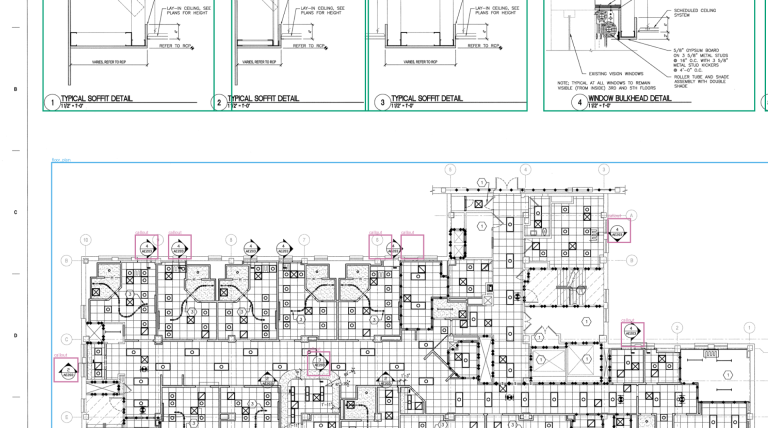
CaseVBench is COXIT’s benchmark for evaluating AI models on architectural drawings. Each model receives a drawing page and is asked to identify five types of objects: cabinets, countertops, floor plans, elevations, and callouts. Model predictions are compared with expert annotations for the same page. This page reports the current results and will be updated as additional models are tested.
Score, cost, and speed across the top models
| Result | Model | Overall score | Cost per page | Time per page |
|---|---|---|---|---|
| Highest score | GPT-6 Astra | 92% | $0.186 | 28.2 s |
| Second-highest score at a lower cost | Claude Opus 5.5 | 79% | $0.040 | 8.9 s |
| Fastest | Claude Sonnet 5.5 | 51% | $0.020 | 5.5 s |
| Lowest cost | GPT-6 Luna | 23% | $0.004 | 29.5 s |
GPT-6 Astra is the only model in this test with an overall score above 80%. Claude Opus 5.5 ranked second and costs about a fifth as much per page. Claude Sonnet 5.5 had the shortest processing time, at 5.5 seconds per page, and scored 51%. GPT-6 Luna costs less than half a cent per page, although it missed many cabinets and callouts and scored 23% overall.
Overall results for all 18 models

In late August, the best model in our first round of tests scored 62%. On a typical sheet of interior elevations, that meant boxes around most cabinets and elevations, with gaps everywhere else. By early September, GPT-6 Astra had raised the top score to 92%. On the same kind of sheet, its boxes line up with the expert markup almost one for one, as the example further down shows.
Claude Opus 5.5 joined the table in late September and took second place at 79%. In practice, it misses about one object in five and draws about one wrong box in five, at roughly a fifth of Astra’s price per page.
Most of the other models land in a wide middle group. Give one of them a sheet and it will usually find every elevation and outline the floor plan. It will also skip many callouts. Countertops give it trouble too, because they appear as thin strips above the cabinets. These small objects account for most of the distance between the middle of the table and the top.
A box counts as a match when it overlaps the expert’s box by at least half. Cost and time are medians per page, and time depends on provider load. Full test conditions.
Performance differs by object type

Overall scores vary across object types. Models generally performed better on large, clearly defined areas such as floor plans than on small objects or narrow shapes.
Cabinets separate GPT-6 Astra from the rest of the table
Casework estimates are built on cabinet counts, so this is the column many readers will check first. GPT-6 Astra scored 82%. Claude Fable 5.1, Claude Opus 5.5 and Qwen3.8-Max follow at around 60%, and most other models land a little below that.
A score around 60% is easy to picture on a single sheet. On one page of interior elevations in our dataset, Qwen3.8-Max boxed 9 of the 16 cabinets. The other seven were left unmarked, which in a takeoff would mean a count short by almost half.
GPT-6 Astra makes a different kind of mistake. It rarely misses a cabinet, and most of its errors are extra boxes. When we reviewed extra boxes across models, some of them marked small cabinets, such as bathroom vanities, that the expert markup had left out. So part of what counts as an error here may be a gap in the markup.
Models often see countertops but outline them poorly
On a drawing, a countertop is a long, thin strip along the top of the base cabinets. That shape is easy to spot and hard to outline precisely. GPT-6 Astra scored 84%, Claude Opus 5.5 51% and GPT-6.1 Sol 48%. Every other model stayed at 34% or lower.
Several models do see the countertops. When we relax the overlap rule, a number of them score around 60%. They point to the right place on the sheet, but the box is too loose to match a strip that thin. For a takeoff, where countertops are measured by length or area, a box in roughly the right place still leaves the measuring to a person.
Floor plans are the easiest object for almost every model
GPT-6 Astra scored 99%, and 15 of the 18 models scored 89% or higher. A floor plan usually fills a large, clearly bounded part of the sheet, so even a loosely drawn box overlaps the expert’s well.
This is also why our next experiments start with floor plans. Once a model reliably finds the plan on the sheet, finding rooms, doors and windows inside it has a stable starting point. The section below shows an early version of that work.
Interior elevations are read well, apart from small detail views
An interior elevation shows a wall as seen from inside the room. Most models handle them almost as well as floor plans. GPT-6 Astra scored 94%, and Claude Opus 5.5, Qwen3.8-Max, Gemini 3.5 Flash and Muse Spark 1.3 each scored 90%.
Some of the misses come from how we label drawings. Our markup counts every view that isn’t a floor plan as an elevation, including small details such as ceiling suspension sections. On one sheet like this, the expert marked seven elevations and none of the models boxed any of them. These views look little like a wall, so part of the gap reflects our labeling rule.
Callouts are the smallest objects on the sheet and the easiest to miss
Callouts are the small circles and tags that tell a reader where a detail or another view is drawn. They connect one sheet to the next. When a full sheet is resized to fit a model’s input, a callout can shrink to a few pixels.
This is where models differ the most. GPT-6 Astra scored 96%, and Claude Opus 5.5 scored 84%, up from 15% for Claude Opus 5. The next model, Gemini 3.8 Flash, scored 68%, and neither Grok model found a single callout.
Errors here go both ways. On one framing plan, the expert markup had a single callout, and Qwen3.8-Max marked 67.
Testing additional object types on floor plans

The screenshot shows COXIT Room Takeoff. The tool identifies the sheet as a floor plan, reads the printed 1:50 scale, and marks rooms, doors, and windows on the drawing. It then measures each room and compares the measured area with the area printed on the sheet. Rooms, doors, and windows are not yet part of CaseVBench, so the results on this page do not include them.
The biggest jumps and drops in CaseVBench


Between test rounds, several vendors released new versions of models we had already tested. Each new version went through the same pages and scoring, so we can see how much a single update changed.
The largest jump came from Claude Opus 5.5. It roughly doubled the score of Claude Opus 5 and moved from the lower half of the table to second place. Most of the gain came from small objects like callouts and countertops, which the earlier version often missed. Claude Sonnet 5.5 made a similar leap over Claude Sonnet 5.
Google’s update moved the same way on a smaller scale. Gemini 3.8 Flash improved on Gemini 3.5 Flash, again mostly on callouts.
Two updates went the other way. GPT-6 Sol scored lower than GPT-5.6 Sol, mainly because it found fewer cabinets, and the next update, GPT-6.1 Sol, recovered part of that loss. Grok 4.7 also scored below Grok 4.6.
For anyone using AI on drawings, a model’s results can shift with a version number. A new release is worth testing on your own sheets before you switch to it.
Cost per page

On one sheet, the difference is a few cents. Over a project, it adds up. Running a 200-page drawing set through GPT-6 Astra costs about $37, and through Claude Opus 5.5 about $8. For a team that works through five sets a week, that’s roughly $185 against $40, every week.
The extra money shows up in the cabinet and countertop counts. Both models find the floor plans and elevations. Opus 5.5 leaves more cabinets and countertops unmarked, and each one it misses is one an estimator has to find and add by hand. Astra leaves far fewer.
Beyond these two, price is a poor guide. Two models at almost the same price can land 40 points apart. Some of the cheapest models outscore ones that cost three times as much.
So the choice comes down to how the results will be used. If someone reviews every sheet anyway, the cheaper model does most of the work for a fraction of the price. If the goal is a count you can trust with fewer corrections, the most accurate model earns its cost. A low price also opens a third option, which is reading each sheet more than once in smaller sections. That can push accuracy above what a single pass gets.
How the score is calculated

For each object it identifies, a model draws a rectangle known as a bounding box. Each predicted box is compared with the expert-drawn box for the same object. Under this benchmark’s scoring rule, the overlap between a predicted box and an expert box must reach a threshold of 0.5 for them to count as a match.
The score combines two measures, recall and precision. Recall is the proportion of annotated objects the model identifies. Precision is the proportion of the model’s predicted boxes that correspond to annotated objects. GPT-6 Astra had 95% recall and 89% precision. Claude Opus 5.5 scored 79% on each measure. Because it reflects both, missed objects and wrong boxes each lower the score.
A score of 92% does not mean a model understands 92% of a drawing. It measures how well the model identifies the five object categories in this benchmark under the stated scoring method. More detail and examples are available in our explainer on how the score works.
Get an email when new models are tested: Subscribe to benchmark updates